Animation frames and character turnarounds in Krita with AI
Krita has a real animation timeline, and MCP Pro for Krita drives it: frame rate and range, keyframes, frames built from layers, and export to frames, sprite sheets and GIFs. This guide covers the common game-art jobs.
Timeline basics
set_animation_settings(fps=8, start=0, end=11)sets the frame rate and the clip range.add_keyframe(frame=4, layer="Hero")creates a keyframe:mode="blank","duplicate"(a copy of the current drawing) or"hold";delete_keyframeandlist_keyframesdo what they say.set_current_frame(6)moves the playhead. Painting and pixel tools then edit that frame of an animated layer.get_animation_inforeports fps, ranges, the current frame and which layers are animated.
Frames from a layer stack
Many artists draw frames as separate layers. frames_from_layers turns them into one animated layer, each layer one keyframe held for hold frames:
frames_from_layers(group="walk", name="Walk", hold=2)Pass layers=[...] (first to last) or a group (its children, bottom first). The source layers are hidden and the clip range is set.
A character turnaround in one call
Draw the views on separate layers, anywhere on the canvas, then:
recipe_turnaround(layers=["front", "three_quarter", "side", "back"],
fps=4, align="bottom",
export_dir="D:/game/hero", gif_scale=6)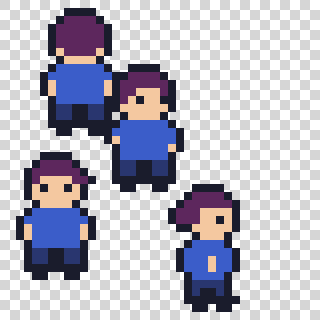 layers
 GIF
set_pixel_rows and pixel_outline at different spots; the recipe aligned them on a common baseline and centre, made one keyframe per view, and wrote the GIF and a sprite sheet.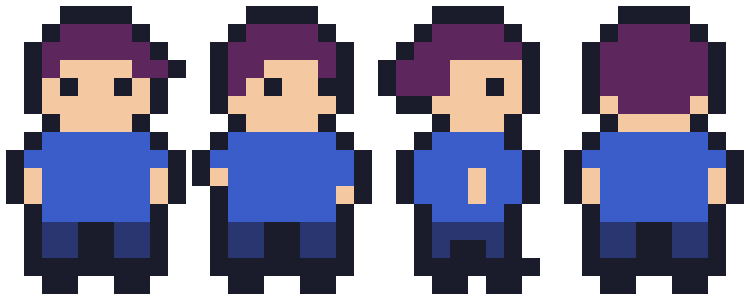
ping_pong=true plays the views back and forth; hold keeps each view longer.The same recipe works for any set of poses: an idle cycle, a jump, expressions. Each run is one undo step.
Importing image sequences
import_frames(files=[...], first_frame=0, step=1) brings existing images in as an animated layer, one file per keyframe, for example frames rendered elsewhere or exported from another tool.
Onion skins
set_onion_skin(previous=2, next=1, opacity=50) sets how many neighbouring frames show and how strongly. Krita cannot report a layer's own onion-skin switch, so toggle_layer=true flips it rather than setting it; the counts and opacity are Krita-wide and the Onion Skins docker shows them after it is reopened.
Looking at frames
get_canvas_preview(frame=3) returns one frame as an image, so the AI can check spacing and alignment frame by frame. For a quick overall check, have it export a GIF and a sprite sheet and look at the sheet.
Export
export_gif(path=..., fps=8, scale=4): the timeline (source="frames") or layers as frames; exact colours for pixel art (up to 255), median-cut otherwise; built-in encoder, no ffmpeg.export_sprite_sheet(path=..., source="frames", columns=4, trim=True): one PNG plus JSON with frame rects and durations.export_animation_frames(directory=..., name_template=...): one image per frame.
Limits
- Keyframe tools drive Krita's Timeline docker; if it is hidden, it is shown briefly while they run.
- Pixel tools on animated layers need 8-bit RGBA, as everywhere.
Get MCP Pro for Krita
$15 once on itch.io, free updates.